
The Lumatic Lab Suite is a professional collection of modular software utilities designed to convert diverse design assets into industry-standard 3D LUTs. The Apps are FREE, run on modern web browsers and run entirely locally so your personal data is not at risk and your images will not be ‘scraped’ or used for AI training purposes.You do not need a login, there is no fee to pay, no subscription and they are neither time or feature limited.
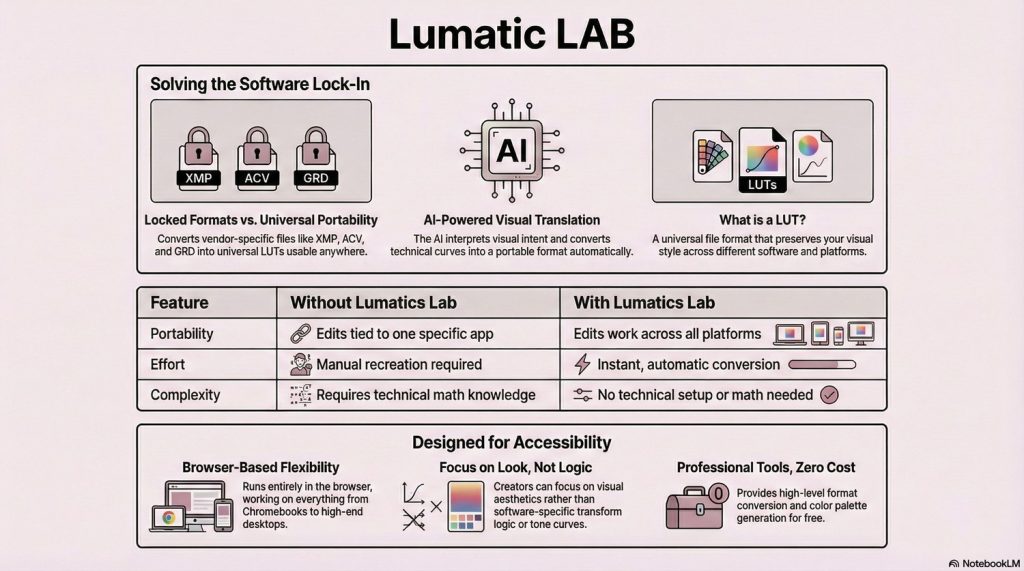
This release consists of:
The GRD Convertor – (A Legacy Bridge) – GRD files (gradient preset) are created for Adobe Photoshop to store custom multi-color fills, enabling consistent color progressions across designs.
The XMP Convertor – ( The Investment Bridge) – XMP files (Extensible Metadata Platform) files are sidecar files that facilitate sharing metadata across Adobe applications like Lightroom, Photoshop, and Bridge but when turned to LUTs, become usable by more applications.
The LUT Resampler – (Consistency in Colour) – The primary purpose of the LUMATIC LAB Resampler is to enable a User to standardise the 3D LUTs they use by converting various cube sizes (such as 17³, 64³, and 65³) into a universally compatible format, most notably the 33³ Master Standard.
By bridging the gap between static files, such as Photoshop curves, swatches, and Lightroom presets – and production-grade workflows, the suite ensures high-fidelity color grading across different platforms. This approach removes the need for beginners to master intricate color mathematics or manual tone curve adjustments, ensuring a consistent aesthetic on any device. Users can also generate custom colour palettes to further enhance their creative workflow without being restricted by software lock-in.
We follow a privacy-first approach, processing all information locally on the user’s device without requiring accounts or cloud uploads. It is specifically built to be accessible for beginners, ensuring that early creative work remains portable and compatible with professional workflows. While the tool is highly versatile, it requires a minimum screen resolution for optimal performance.
The system operates on a rigorous “Absolute Redraw” architecture, using immutable data buffers to prevent image degradation while maintaining visual consistency through a selectable dark/light/ middle-gray workspace. Advanced features include spectral mixing and histogram matching, allow users to remap tonal DNA and luminosity with mathematical precision.
Every tool follows a unified engineering manifesto, providing standardised exports and robust performance. Tailored for modern web browsers, they’ll run anywhere and have been specifically designed to run on Chromebook Plus.
Ultimately, the suite serves as a sophisticated technical bridge for creators to translate complex creative metadata into versatile, high-resolution assets.
FAQs
- Do I need to install anything?– No – fully browser-based
- Are they free? – Yes
- Are my files uploaded? – No – local-only processing
- Can I use LUTs later in commercial applications ? – Yes – any application that supports LUTs.
- Why 33³ LUTs? Smooth tones, accurate colours, broad compatibility
- I’m just a beginner, have you a document to help me understand ? – Yes click this link
Limitations
- Screen resolution : minimum 1080p
- Most any modern web browser.
- If using a Chromebook : Chromebook Plus or better
- Preset compatibility : Nik Presets Version 4 only