
The following examines the offerings of Photo Editors both paid and FREE (our review of FREE apps) in 2026. It highlights how automation has transformed professional workflows. The Industry staples like Adobe Lightroom and Photoshop remain dominant for their cloud integration and generative capabilities, while competitors such as ON1 Photo RAW and Capture One offer powerful alternatives through one-time purchase models. Darktable (comparison review here) offers a credible FREE alternative.
Specialist tools like Aiarty Image Enhancer (in depth review) and DxO PhotoLab focus on technical precision, including high-end upscaling and industry-leading noise reduction. Creative platforms like Luminar Neo leverage artificial intelligence for complex tasks such as sky replacement and relighting.
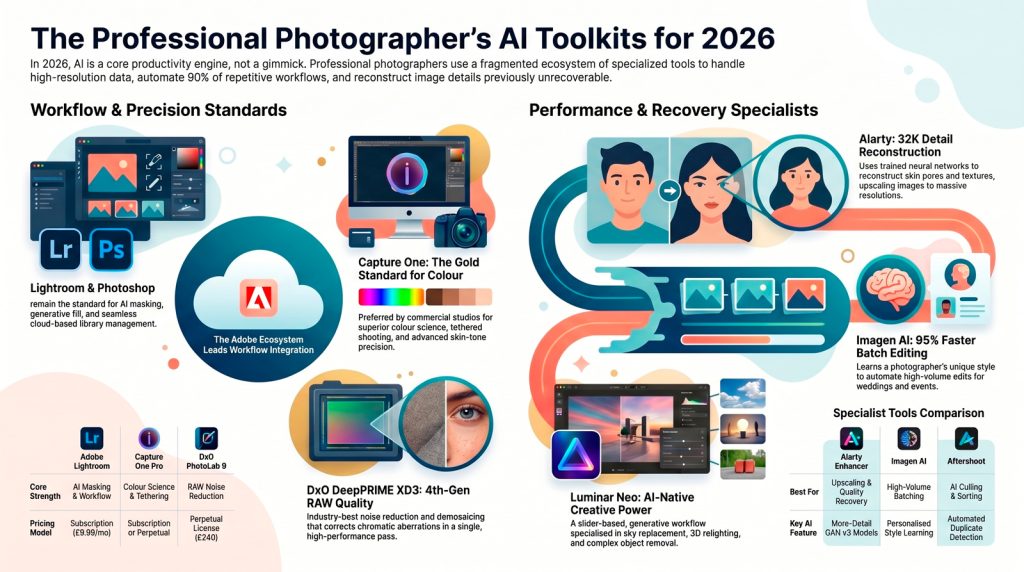
High-volume photographers benefit from batch-processing assistants like Imagen AI and Aftershoot, which automate culling and consistent style application. Our Report serves as a comprehensive guide for any photographers choosing tools based on image quality, speed, and cost-effectiveness.
Summary: Matching the Tool to Your Creative Mission
To find your ideal 2026 workflow, identify the persona that matches your goals:
- The Creative Adventurer (Luminar Neo): Best for those who want to turn ordinary travel shots into extraordinary art using AI-assisted relighting and sky swaps with zero manual masking.
- The High-Volume Speedster (ON1 Photo RAW 2026): Best for wedding and event photographers. It provides the best value-to-speed ratio, especially for Fujifilm (X-Trans) shooters who need fast, accurate demosaicing.
- The Technical Perfectionist (AIarty, DxO PhotoLab 9 or Darktable): For those who care about the science of the pixel. If you shooting low light or high-ISO, DxO’s DeepPRIME XD3 is the industry champion. (If you have a $0 budget, Darktable is its open-source equal in depth).
- The Occasional/Budget Editor (Affinity or WPS Photos): Ideal for social media creators or students. Use WPS for 5-second lighting fixes and Affinity for professional-grade layer compositing without a subscription. Those with some knowledge of Photoshop will find Photopea good value.
Final Insight: In 2026, your creative vision is no longer limited by your ability to pay a monthly subscription. Provided you understand the technical groundwork of your chosen AI tools, the focus can finally return to where it belongs: your unique perspective. Choose the tool that fits your hardware, master its neural network settings, and own your creative output.
The “Big Three” Affordable All-in-Ones
In the 2026 landscape, three primary contenders offer comprehensive RAW development and asset management without a mandatory recurring fee.
| Software Name | Core Philosophy | Standout AI Feature | Price Model |
|---|---|---|---|
| DxO PhotoLab 9 | Scientific precision and maximum optical image quality. | DeepPRIME XD3: Simultaneous denoising and demosaicing with chromatic aberration correction. | Perpetual License ($239.99 Elite) |
| ON1 Photo RAW 2026 | The comprehensive, high-speed “Lightroom Alternative.” | Brilliance AI: Intelligent, scene-aware tone and color balancing in a single pass. | Perpetual License ($99.99) |
| Luminar Neo | AI-native creative manipulation and ease of use. | Sky AI & GenErase: Generative AI that reshapes 3D scenes and removes complex objects. | Perpetual License ($119.00+) |
Finding Your Initial Creative Match
- The Creative Adventurer: Choose Luminar Neo if your work involves heavy landscape or travel manipulation. Its Sky AI and Relight AI build 3D depth maps, allowing you to reshape environment lighting without manual masking.
- The High-Volume Speedster: Choose ON1 Photo RAW 2026 if you manage thousands of frames. Its Keyword AI automatically tags metadata, while Brilliance AI handles 90% of technical corrections instantly. It also supports X-Trans (Fujifilm) sensors with specialized demosaicing updates.
- The Technical Perfectionist: Choose DxO PhotoLab 9. It utilizes laboratory-measured lens profiles to correct optical flaws with unparalleled precision. By solving for noise and demosaicing within a single neural network pass, it minimizes the artifacts that plague traditional processors.
NB:: While these tools handle general editing with excellence, specific “rescue” tasks often demand specialized specialists capable of bridging the “distribution gap” between synthetic training data and real-world sensor noise.
Specialized AI Power-Ups: Image Recovery and Detail
When a shot is compromised by high-ISO noise or motion blur, general-purpose editors may fail. Specialized tools like Aiarty Image Enhancer and Topaz Photo AI are designed for high-fidelity restoration.
The Three Pillars of Recovery
- Denoising: Modern AI removes luminance and color noise while preserving high-frequency textures like hair and fabric. Note: While DxO PureRAW 6 and Lightroom AI Denoise are limited to RAW files only, specialists like Aiarty and Topaz can rescue JPEGs and TIFFs.
- Upscaling: Utilizing generative models like More-Detail GAN v3, Aiarty can reconstruct missing pixels to reach 32K resolution. This is vital for preparing low-res archival files for large-format printing.
- Sharpening: Correcting lens softness and motion blur. Topaz Photo AI’s Autopilot is the current standard for detecting and repairing specific blur patterns (e.g., camera shake vs. missed focus).
Pricing and Ownership Shifts
- Topaz Photo AI: As of October 2025, Topaz moved to a subscription-only model ($399/year or $21/month), which may conflict with budget-conscious workflows.
- Aiarty Image Enhancer: Offers a perpetual license ($99.00). Its “Real-Photo v3” model is highly effective at maintaining natural skin textures without the “plastic” look common in lower-end AI tools.
While these specialists represent a financial investment, 2026 has also seen the rise of zero-budget tools that rival the industry standards.
The Zero-Budget Heroes: Free & Open-Source Options
Professional depth no longer carries a mandatory cost. The following tools offer pro-grade workflows for $0.
Quick Choice Checklist
- Darktable: The primary open-source alternative to Lightroom Classic. It features a non-destructive RAW workflow and 60+ pro modules. Its “scene-referred” workflow provides elite control over highlights, though the learning curve is steep.
- Affinity (by Canva): Now completely free. This is the definitive Photoshop replacement. It supports full layers, complex compositing, and HDR merging. It lacks a library/DAM system but handles the “pixel-level” heavy lifting perfectly.
- WPS Photos: A streamlined “1-tap” tool within the WPS suite. Its “AI Enhance” feature lifts shadows and recovers highlights in 3–5 seconds using scene-aware algorithms.
- Photopea / Pixlr: Browser-based heroes. Photopea supports PSD layers and RAW files directly in the browser, making it ideal for editing on Chromebooks or locked-down work hardware.
Hardware & Workflow Compatibility Check
In 2026, “Generative Accuracy” is computationally expensive. Choosing software that your computer can actually run is critical to a fluid workflow.
“Will My Computer Run It?”
| Category | Software Examples | Hardware Requirements | Learning Curve |
|---|---|---|---|
| Heavy Resource Demand | Luminar Neo, Topaz Photo AI, DxO PhotoLab 9, AIarty | 16GB+ RAM and dedicated GPU. Specifically struggles with 45MP+ files on mid-range hardware. | 1-Tap to Mid |
| Mid-Range Optimized | ON1 Photo RAW 2026, Darktable | Standard modern laptops (8GB-16GB RAM). | Mid to Advanced |
| Lightweight / Browser | Photopea, Pixlr, WPS Photos | Runs on almost any hardware (Chromebooks/Web). | 1-Tap (Beginner) |
Technical Insight: The Distribution Gap
Higher-end tools like DxO PureRAW 6 and Aiarty succeed because they account for the “distribution gap” – the statistical difference between idealized synthetic AI training and the messy realities of real RAW data (sensor heat, banding, dark current). Pro-grade tools are trained on laboratory-calibrated camera-lens combinations, whereas browser-based “1-tap” fixes often rely on generic filters that can introduce “waxy” skin or artifacts.