
Professional Power Without the Paywall
With the direction that Adobe Lightroom is travelling in, many users are looking for an alternative. This is to introduce you to Darktable, a comprehensive open-source alternative to Adobe Lightroom.
Darktable is a robust, full-featured project that rivals and often surpasses Adobe Lightroom in its depth of lighting control and color correction. Unlike “limited” free software, it contains no hidden costs or future feature locks. For beginners, this represents the opportunity to master professional-grade tools that will never demand a credit card to access your own creative work.
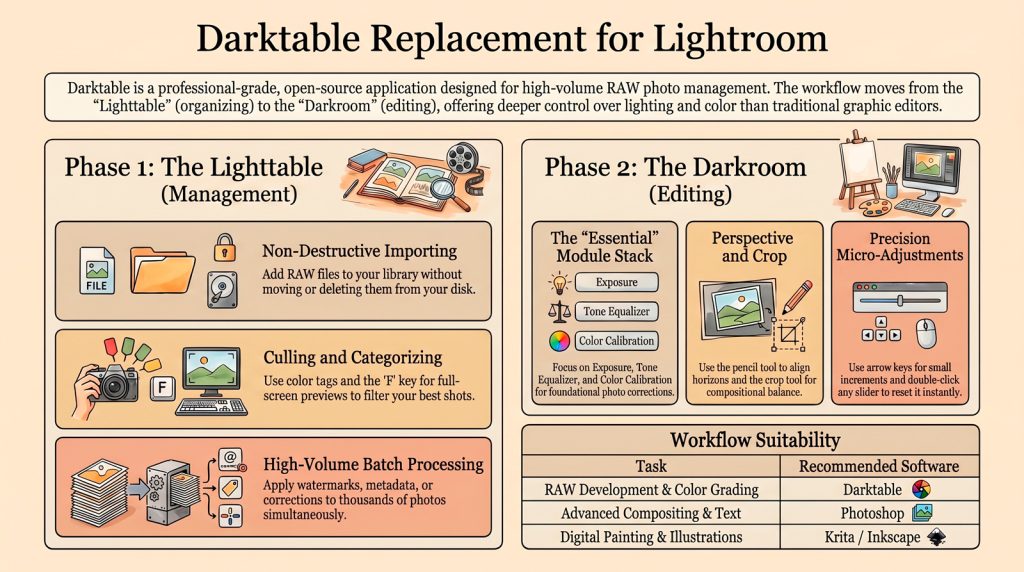
The software is specifically designed for professional RAW photo management, offering users deep control over colour correction, lighting adjustments, and high-volume batch processing. While the guide covers essential workflow techniques such as interface navigation and image exporting, it distinguishes Darktable from tools like Photoshop, which remain better suited for complex graphic manipulation.
Accessible across all major operating systems, the program is presented as a cost-free, community-driven solution for photographers. Ultimately, the source serves as a foundational roadmap for those looking to refine their digital photography without the need for expensive subscriptions. Darktable can be downloaded here.
Non-Destructive Intelligence
The software utilizes catalog-based management to create a clear distinction between “Lighttable” (organization) and “Darkroom” (editing). When you choose to “remove this one image from Darktable without deleting from disk,” your original RAW files remain untouched. This non-destructive architecture offers new editors the emotional peace of mind to experiment and organize without the risk of losing their primary data.
Hyper-Efficient Batch Processing
While traditional editors focus on one file at a time, Darktable is built for high-volume shooters. It allows you to apply watermarks, metadata, or exposure edits to hundreds of photos simultaneously. For drone or smartphone photographers managing massive libraries, this batch efficiency provides massive relief, transforming hours of tedious individual editing into a streamlined, automated process.
“This is the real deal fully professional, it just happens to be open source and free… a project owned by the community for the community.”
Technical Tip: The “Essential” Workflow
The community-driven nature of Darktable allows for deep interface customization. To avoid “module overwhelm,” create a custom module preset group named Essential. By filtering your workspace to show only core tools—specifically Exposure, Tone Equalizer, and Color Calibration—you strip away the technical clutter. This allows you to master the foundations of light and color balance before exploring more advanced modules.
Reclaiming Your Creative Freedom
Darktable is more than just a free tool; it is a foundational roadmap for professional digital photography. By mastering this community-owned workflow, you gain total control over your creative assets and professional growth. Are you ready to reconsider your reliance on paid subscriptions ?