
Beyond the Hype:
6 Impactful Takeaways from Luminar’s Fall Update (and a Surprising Tech Twist)
For years, digital visual creators have been forced to navigate a fragmented software landscape.
A typical editing workflow involves bouncing between catalogue applications for asset organization, specialized desktop suites for pixel manipulation, and specialized third-party plugins for atmospheric effects. Compounding this operational fatigue is the constant threat of subscription traps – Software-as-a-Service (SaaS) models that lock creators out of their non-destructive edit stacks the moment a monthly payment ceases.
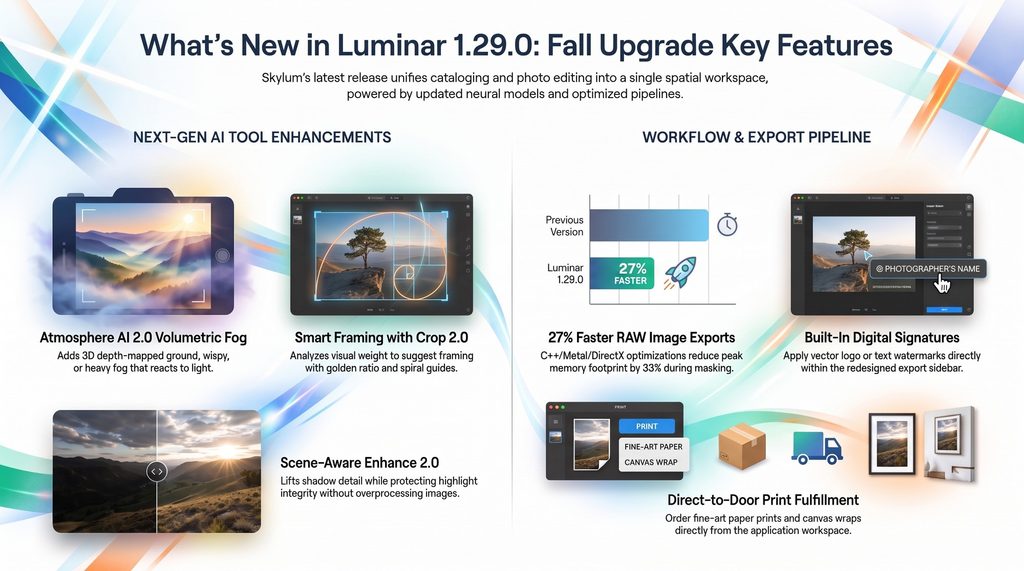
In response to these structural friction points, Skylum has officially released Luminar Version 1.29.0 (designated as the Fall Upgrade 2026, launching October 28, 2026). This update marks a significant milestone, following Skylum’s strategic decision to retire the “Neo” suffix and consolidate its product line under the singular brand name Luminar. By streamlining its identity, the company aims to unify its desktop application across macOS and Windows with mobile tools and browser-native environments.
1. Catalogue and Edit Modes Finally Merge
Legacy image editing software often enforces a strict operational barrier between asset management and image processing. In earlier iterations of Luminar, users were forced to toggle constantly between a Catalogue tab (which housed file browsing alongside specialized generative AI tools) and an Edit tab (where primary processing modules resided). This division frequently led to folder-hunting navigation headaches and broke creative momentum.
Luminar 1.29.0 addresses this modal separation by unifying file organization and non-destructive image processing into a single spatial workspace. The right sidebar has been fully re-architected so that Presets, Manual Adjustments, Edit Stacks, Metadata, and Generative AI utilities are accessible from one continuous canvas. Complementing this layout is a browser-style breadcrumb navigation bar at the top of the workspace, allowing photographers to track their exact folder hierarchy and move backward or forward without losing their active editing state.
To support this unified canvas, Skylum refactored the application’s underlying C++/Metal/DirectX execution pipeline. The resulting hardware efficiency gains are substantial:
| Performance Metric | Architectural Gain (C++/Metal/DirectX Refactoring) |
|---|---|
| High-Resolution RAW Exports | 25% to 27% faster execution (macOS & Windows) |
| Preset Previews | Up to 4x faster real-time rendering |
| System Memory (RAM) Footprint | 33% reduction during complex masking operations |
For high-volume batch workflows, cutting peak memory usage by a third prevents system throttling and keeps thermal fans quiet during heavy processing. Alongside these interface refinements, Skylum updated core processing algorithms:
- Enhance 2.0 (Accent AI): Upgraded to address historical overprocessing tendencies. Where older algorithms could introduce color banding or harsh highlight clipping in high-contrast skies, Enhance 2.0 applies intelligent highlight protection to balance exposure while preserving natural color saturation—offering a cleaner tone-curve response comparable to industry standards like Nik Collection’s ProContrast.
- Crop 2.0 (Smart Compositions): Evaluates visual weight and leading lines across the frame to recommend optimized crops. It introduces specialized grid overlays, allowing creators to align framing against the Golden Ratio, Golden Spiral, Golden Triangle, Centered guides, or classic Rule of Thirds.
2. Atmosphere AI 2.0 Generates True 3D Fog You Can Move
Atmospheric tools in traditional photo editors have historically functioned as flat two-dimensional overlays – similar to placing a uniform linear or radial haze gradient over an image regardless of underlying geometry. Atmosphere AI 2.0 shifts this paradigm by using computer vision models to derive an estimated three-dimensional depth map directly from a standard 2D RAW or JPEG photo. This spatial depth understanding enables volumetric fog and haze to interact realistically with light direction, depth of field, and scene geometry.
Atmosphere AI 2.0 introduces several granular spatial controls:
- 3 Volumetric Profiles: Users can select Ground Fog (low-altitude vapor hugging terrain or water), Wispy Fog (mid-depth atmospheric drift), or Heavy Fog (full-scene atmospheric saturation).
- Interactive Spatial Controls: Adjustments include cloud scale, structural patchiness (from smooth mist to clumpy cloud clusters), height limits, and a vibrance control that borrows ambient color tones directly from the photograph.
- 3D On-Screen Handles: Creators can manually drag and push fog forward or backward along the Z-axis in 3D space, wrapping atmospheric mist around subjects such as trees, vehicles, or architectural structures.
This spatial depth integration represents a notable shift in how neural engines handle dimensional light and atmosphere:
“We’ve now made such big steps forward that the holy grail of what was promised to us is now being realized… you can clearly see that the AI has identified the three-dimensionality of this scene.” – Anthony Turnham
3. Luminar Prime Introduces Anti-Obsolescence Subscription Rights
The standard Software-as-a-Service model in creative software continues to face pushback from creators who dislike paying monthly access fees under threat of losing access to their project files. Skylum’s Luminar Prime framework directly addresses this friction by replacing older seasonal upgrade passes with an anti-obsolescence guarantee.
Under the 365-day Luminar Prime model, if a user’s subscription lapses, they retain permanent, perpetual access to every desktop feature and core application update unlocked during their active term. You retain functional ownership of the software versions generated while you were paying.
Skylum Luminar Pricing (Fall 2026)
- Luminar Prime Annual ($69 Early-Bird / Black Friday Launch Price; $99 Standard): Includes 365 days of full desktop application updates (kept permanently upon expiration) alongside 365 days of cloud generative AI execution rights.
- All Platforms / Max Tier ($139–$159): Extends access across macOS, Windows, Mobile, and Luminar Web (a browser-native editing environment launching Fall 2026 that allows full RAW editing inside any standard browser without local app installation). Includes full access to the Creative Asset Library (2,150+ presets, 500+ LUTs, 400+ overlays, 550+ skies).
- Standalone License (€99–€159 / $99 One-Time): A single-station desktop license providing local core features (Enhance 2.0, Atmosphere 2.0, Crop 2.0) without multi-device cloud synchronization.
4. You Can Now Watermark and Order Framed Canvas Prints Directly
For working visual artists, preparing an image for client delivery or physical display traditionally required exporting files to intermediate folders, launching dedicated watermarking tools, or logging into external web portals to order prints. Luminar 1.29.0 resolves this operational friction by expanding its export and output modules.
Built-In Vector & Raster Signatures
The redesigned export panel incorporates built-in digital signaturing and graphic watermarking tools:
- Flexible Branding: Supports custom typed text with system typography or imported graphic logos and handwritten signatures.
- Advanced Blend Modes: Features blend options such as Screen mode, allowing black-background handwritten signatures to overlay cleanly onto photos without requiring background removal in external software.
- Precise Placement: Provides opacity controls, drop shadows, inset distance positioning, and individual per-image signature adjustments during batch export queues.
- Keyboard Shortcuts: Built-in support for standard copyright symbols using
Option+Gon Mac andAlt+0169on Windows.
Direct Print Fulfillment API
In addition to supporting local desktop printers with custom ICC color profiles and paper setup dialogs, the output module integrates a commercial print fulfillment API.
Without leaving the editor, creators can order Fine Art Prints (including premium papers like Hahnemühle Photo Rag), C-Type prints, or Gallery Canvas Wraps. The interface features interactive “on the wall” visualization previews, frame configuration options, and mirror-wrap edge previews for stretched canvas, shipping finished physical prints directly to residential or commercial addresses.
5. A Tale of Two Luminars:
Skylum’s App Thrives While the LiDAR Giant Liquidates
A critical point of disambiguation for tech analysts and investors following the October 2026 software launch is the corporate distinction between Skylum’s image editing platform and Luminar Technologies, Inc. (formerly traded under NASDAQ: LAZR / OTC: LAZRQ).
While Skylum’s software business continues to expand, the automotive LiDAR hardware manufacturer bearing the same name underwent financial collapse and legal liquidation:
- Bankruptcy Filing: Severe cash burn (accumulating an operating deficit exceeding $1.3 billion) and canceled automotive OEM integration contracts (including primary programs with Volvo) forced Luminar Technologies, Inc. into voluntary Chapter 11 bankruptcy in late December 2025.
- Section 363 Asset Auctions: In early 2026, the bankruptcy court supervised the liquidation of the company’s operating assets. The semiconductor subsidiary, Luminar Semiconductor, Inc. (LSI), was sold to Quantum Computing Inc. (QCi) for $110 million cash. Global LiDAR sensor assets, inventory, IRIS/HALO product lines, and 1550nm optics intellectual property were acquired by MicroVision, Inc. for ~$33 million cash.
- Equity Cancellation: On April 6, 2026, the court confirmed the Fourth Amended Plan of Liquidation. Executive management resigned, public equity (LAZRQ) was formally cancelled without financial recovery for shareholders, and the corporate shell was dissolved.
Skylum’s image editing platform is now the sole active operating tech entity bearing the Luminar name.
6. AI Assistant 2.0 Remains Hit-or-Miss
Advanced Masking Is Delayed Version 1.29.0 delivers solid performance optimizations, specific automated tools but still exhibits operational limitations:
AI Assistant 2.0 Loop Glitches
AI Assistant 2.0, designed to interpret natural language requests (e.g., “make this image moody and cinematic”), can encounter execution loops when processing spatial requests. During hands-on testing, when explicitly prompted to “add fog,” the assistant frequently applied Dehaze (+20)—the exact opposite of fog—while stacking generic Golden Hour glow and Landscape contrast adjustments rather than launching Atmosphere AI 2.0.
Testing Scenario:
- User Prompt: “Add subtle fog to this scene.”
- AI Assistant Action: Applies Dehaze (+20) $\rightarrow$ Increases Contrast $\rightarrow$ Stacks Golden Hour Glow.
- Result: The image becomes clearer, warmer, and higher in contrast, failing to introduce atmospheric fog.
Masking Limitations & Missing Overhaul
While Atmosphere AI 2.0 offers impressive 3D spatial positioning, it currently lacks manual masking controls (brush, radial, or gradient masks within the tool itself). If the neural engine misinterprets complex geometry, creators cannot manually brush out or isolate specific fog patches.
Furthermore, while masking execution speed is improved by a 33% reduction in RAM usage, the anticipated major masking engine overhaul—promising automated subject/background selection, mask intersection, and mask subtraction—was held back from the October 28 release and rescheduled for late November 2026.
7. Conclusion & Final Reflection
Luminar Version 1.29.0 balances intelligent neural AI features with functional software engineering. By eliminating modal UI division with the unified spatial workspace, adding volumetric controls in Atmosphere AI 2.0, streamlining output pipelines via built-in watermarking and print fulfillment, and adopting consumer-friendly perpetual access rights through Luminar Prime, Skylum delivers a practical update that addresses real workflow friction.
As photo editing platforms evolve from manual pixel manipulation toward spatial depth mapping and conversational AI interfaces, the primary role of the visual artist continues to shift from mechanical execution to aesthetic direction.
As photo editors shift from rigid pixel-pushing to fluid 3D spatial manipulation and natural-language AI prompts, where do you draw the line between artificial assistance and authentic artistic vision?
Luminar Prime Fall Upgrade 2026 is currently available for pre-order with a 50% discount.