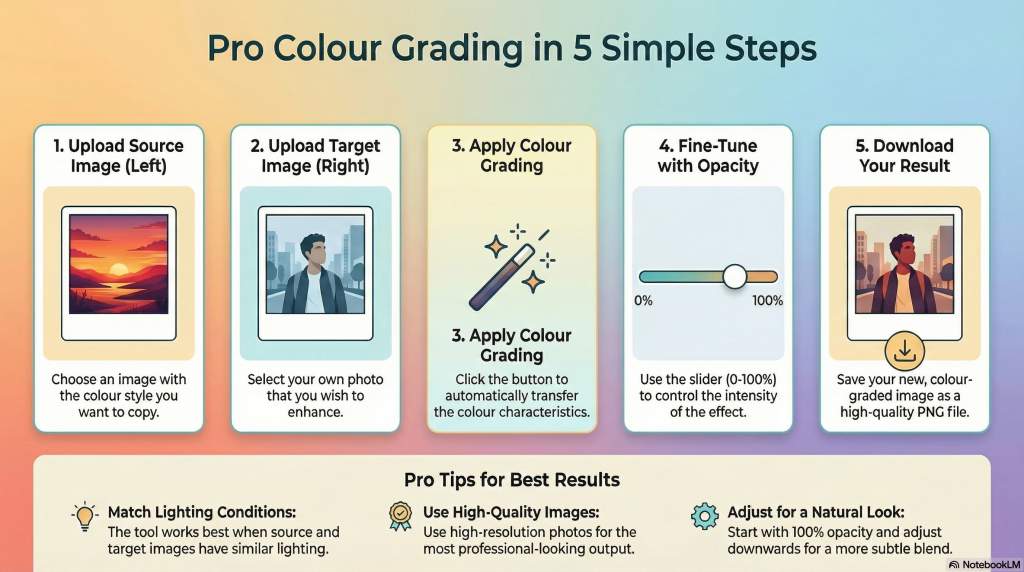
WORKED EXAMPLE ::

If you’ve ever spent hours trying to get the color just right on a photograph, you know the struggle. We see images every day with a distinct, professional mood – a cinematic warmth, a cool and modern edge, or a consistent aesthetic that ties an entire portfolio together. But recreating that look often feels like it requires years of experience with complex, expensive software, tweaking endless curves and color wheels.
The goal isn’t just to make an image look “better”, but to make it tell a specific story through its color. The PhotoEditHelp Color Grading Transfer Tool, is a web-based application designed to apply the color characteristics, tone, and mood from one image (source) to another (target). For a detailed discussion on the tool, download this pdf file.
- All the Magic Happens on Your Device – No Software Needed.
Convenience: The tool is immediately accessible; you simply open a web page and it’s ready to use, eliminating the need for hefty downloads or complex installation.
Speed: Processing is nearly instantaneous because nothing is uploaded or downloaded from a server during the image manipulation process.
Privacy: This is a crucial feature. The tool performs all image processing locally, meaning your photos never leave your computer and are never uploaded to a server, offering users total privacy over their data. - It’s Not a Filter, It’s a Statistical Transplant.
The tool’s “color grading transfer” is a sophisticated process that transcends simple filtering. It starts by conducting a statistical analysis of the source image, computing the mean and standard deviation of its RGB color channels. This data is then used to intelligently map the source image’s color space – its “color DNA”—onto the target image. However, it’s more than just raw numbers; the technique also incorporates intelligent tone matching to adjust brightness and contrast, and a mood transfer step to preserve the artistic atmosphere. This combination of statistical data and artistic interpretation is what truly sets it apart. - Any Image Can Be Your New Color Palette.
The true creative potential of the tool lies in its flexibility regarding the “source image.” Unlike tools limited to a fixed library of built-in presets, this tool allows any uploaded image to serve as the color source. This means users can borrow the aesthetic from a professionally graded photograph, a still from a favorite movie, or any picture with appealing color characteristics.
This immense feature effectively transforms the entire world of images into a potential color palette. - The Secret to a Natural Look Is Dialing It Back.
After the tool works its magic, it presents you with an opacity slider to control the effect’s intensity. The tool works best when the source and target images have similar lighting and subjects. Getting this right upfront makes the final blend with the opacity slider far more convincing.
Once you’ve made a smart match, the slider becomes your tool for nuance. The user guide offers a crucial pro-tip: “Start with 100% and adjust down for natural-looking results”. By dialing back the opacity, you create a blend between the original images’ colors and the new, transferred grade. This often produces a more convincing final image, one that feels enhanced rather than completely altered. It’s a reminder that the best editing is often invisible, gently guiding the mood without overpowering the original photo.
It leaves you with a question: Now that you can borrow the mood from any image in the world, what story will your photos tell?