
Mastering the Atmosphere: 3 Secrets to Flawless Sky Swaps
There’s an ON1 ‘How To ‘ video here.
Every photographer understands the struggle of transforming uninspired RAW data into a high-dynamic-range narrative, only to be hindered by a flat, featureless sky. ON1 Sky Swap AI eliminates this roadblock using machine learning and curated 8K UHD aerial imagery from OcuDrone.
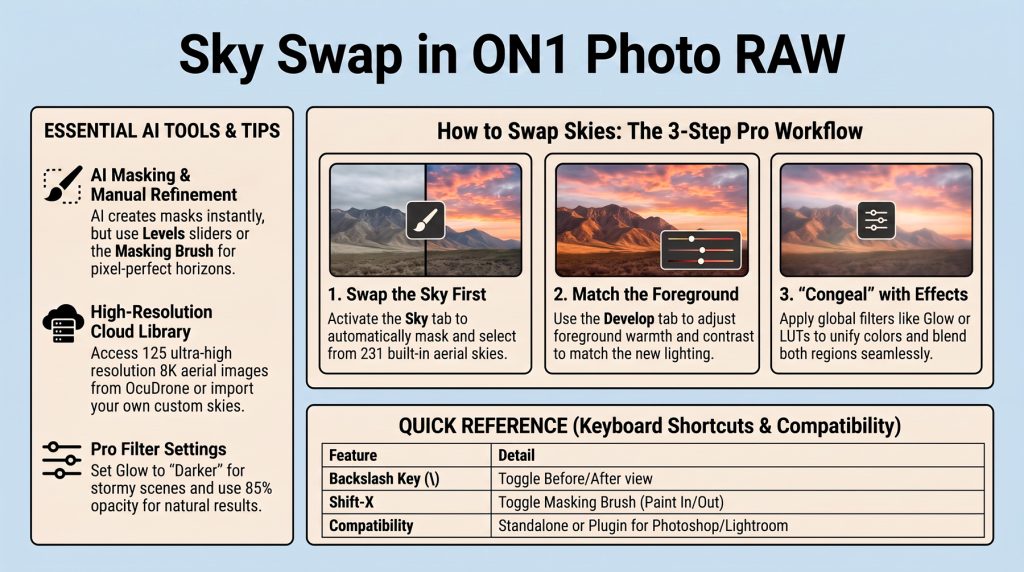
- Adopt a “Sky-First” Workflow Execute your swap at the beginning of the edit to prevent redundant “double-editing”—the inefficiency of re-processing a foreground because a late-stage sky change shifted the lighting requirements. Selecting a background like OcuDrone Seriously Stormy establishes the visual target for all subsequent adjustments.
- Manually Sync the Foreground Navigate to the Develop tab to refine the AI’s mask. Within the Color section, manually cool the temperature (approximately -1,000°) and adjust contrast to match the specific mood and luminance of your new atmospheric backdrop.
- “Congeal” with Global Effects To finalize the optical illusion of a single exposure, use the Effects tab to apply a unified color grade. Filters like Glow (set to “Darker” mode) or the “Chill” LUT congeal the distinct regions into a singular, believable photograph.
Reflection
This workflow grants precise artistic control, allowing you to synthesize disparate elements into a captivating vision that transcends the limitations of a single exposure.