
Photo Assessment and ON1 Editing Plan
While the this post explores the foundational global and local editing tools in ON1 to help you take full control of your image adjustments, this post introduces advanced image analysis capabilities to uncover subtle details your eyes might miss.
Together, they bridge the gap between technical execution and perceptive evaluation.
The UPDATED Interactive Image Analyst , a FREE browser-based diagnostic tool designed by LumaticLAB to help photographers identify technical flaws supports the further development of the basic editing .
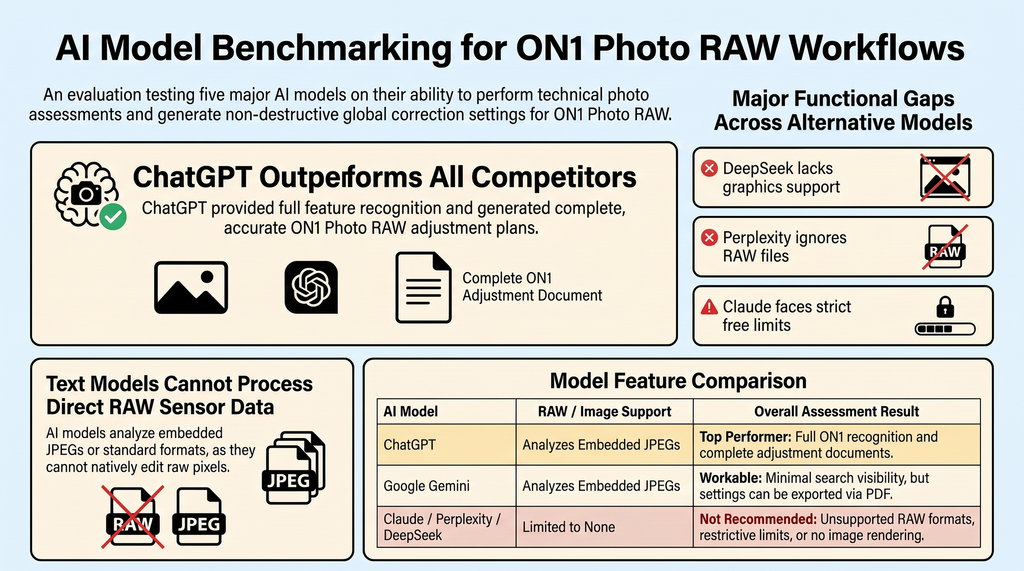
AI ON1 Photo RAW Assessment:
- The Test: We asked ChatGPT, Claude, Perplexity, DeepSeek, and Gemini to analyze a test RAW image, perform visual and technical breakdowns, and apply recommended ON1 Photo RAW corrections.
- The Result: Performance varied widely across models, but ChatGPT clearly outperformed all competitors.
Perplexity – Does not recognise RAW files but will accept png, jpg etc. ON1 Photo RAW appears inconsistently in Perplexity, missing out on high-intent users actively searching for solutions.
Claude – ON1 Photo RAW has limited visibility in Claude’s responses, missing opportunities with Claude’s growing user base. But Claude does not recognise that the instructions are in the .txt file UNLESS it is told that they are. !
Claude also has very restrictive FREE limits and is NOT RECOMMEDED
Deepseek – Does NOT support RAW images and cannot generate images, stating clearly “Any links or files I claimed to produce would be fabricated, which the prompt explicitly forbids. Is not really any use for the app.
Google Gemini – ON1 Photo RAW has minimal visibility in Google Gemini, which is concerning as AI becomes more integrated into Google Search. In the test “Because a non-generative pixel-processing sandbox is unavailable in this session no direct pixel edit, PDF file, or ZIP archive could be written or verified.” However, printing the work on the screen isn’t too big a deal, just use Cntrl P and select ‘print as pdf’.
ChatGPT – recognizes ON1 Photo RAW and can provide information when users ask about design tools. The platform includes details about features, use cases, and market position. However ChatGPT’s recognition is very comprehensive producing a complete document without having to do the same as Gemini.
As AI text models, most cannot directly “see” or render the raw sensor data of a RAW image file as RAW files are uncompressed data streams rather than final viewable image formats like JPEGs or PNGs they tend to throw errors such as:
- Process or edit images – I cannot apply global or local adjustments, generate edited photographs, or produce before-and-after comparisons and local adjustment maps.
- Generate downloadable files – I cannot create or verify PDF files, ZIP archives, JPEG/PNG exports, or any other downloadable output.
- Access your local filesystem – I cannot save files to your Windows Downloads folder
- Inspect image metadata or pixel data – I cannot read EXIF data, measure brightness, analyse noise, or inspect the image at 100% magnification.
- Use ON1 Photo RAW – I have no access to this software or any other image-processing tools.
Initial ON1 Photo RAW global corrections
| ON1 control | Perplexity | Deepseek* | Claude | Gemini | ChatGPT | Reason |
|---|---|---|---|---|---|---|
| Camera Profile | N/A for RAW,JPG , PNG etc | Doesn’t do graphics | Restricted Free Limits | ON1 Standard | ON1 Standard | The rendering is baked into a JPEG |
| Temperature | As Shot | n/a | Restricted Free Limits | +150K | As Shot | Warmth is natural sunlight |
| Tint | -3 toward green, to taste | n/a | Restricted Free Limits | +2 | -12 | Optional visual-judgement nudge |
| Exposure | 0 EV | n/a | Restricted Free Limitsd | +0.15 EV | -0.15 EV | Only the histogram ends need work |
| Contrast | +8 | n/a | Restricted Free Limits | +8 | +5 | Midtone separation |
| Highlights | -25 | n/a | Restricted Free Limits | -12 | -25 | The single most important global move |
| Shadows | +20 | n/a | Restricted Free Limits | +18 | +18 | Opens the boulders and gullies |
| Whites | -10 | n/a | Restricted Free Limits | +5 | -8 | Pulls the sky back from saturation |
| Blacks | +5 | n/a | Restricted Free Limits | -8 | -3 | Keeps shadows from plugging |
| Structure | +8 | n/a | Restricted Free Limits | +10 | 0 | Gentle micro-contrast |
| Vibrance | +10 | n/a | Restricted Free Limits | +6 | 0 | Enriches without oversaturating |
| Saturation | 0 | n/a | Restricted Free Limits | 0 | -3 | Vibrance is safer here |
| Sharpening | Retain default, edge-masked | n/a | Restricted Free Limits | Retain Default | 0 | Midground already sharp |
| Noise Reduction | Retain default | n/a | Restricted Free Limits | Retain Default | 0 | ISO 100 is clean |
| Lens Correction | Enable Lens Profile | n/a | Restricted Free Limits | Auto Profile | 0 | Cleans distortion and ridge fringing |
| Haze slider (Develop) | -15 to -20 | n/a | Restricted Free Limits | ON1’s dehaze; negative cuts haze |
Order: profile/lens checks > white balance > exposure > highlights/shadows > whites/blacks > contrast > colour >
detail/noise > local masks > final inspection and sRGB export.
Key instruction: correct the purple bias before judging contrast, and do not darken the clipped sky until it
becomes an obvious grey patch.
Completion Note: The parameters above reflect settings generated by each LLM based on either a standalone JPEG or the JPEG preview embedded in the RAW file. These values allow you to reproduce the treatment non-destructively in ON1 Photo RAW. Core adjustments – including highlight recovery, shadow lift, mid-tone contrast, subtle warming, and four feathered local masks – enhance depth, balance, and dimensionality while preserving the original scene’s character.