
Today we are posting an update to the ACO Convertor including a support pack (ZIP) format containing a demo image, ACO file and full documentation. The ACO Convertor is one part of the collection of Lumatic LAB modular software utilities designed to convert diverse design assets into industry-standard 3D LUTs.
Have you ever found the perfect brand color in an Adobe Swatch (.aco) file and wished you could instantly apply its “soul” to your photography or video projects? Stop settling for flat color overlays. The LUMATIC LAB ACO Converter, is a utility designed to bridge the gap between designer palettes and high-end grading workflows.
Unlike generic editors, this standalone tool allows you to transform any Adobe Swatch into a professional-grade 3D LUT (.cube). It’s lightweight, fast, and engineered specifically for power users who demand precision on any device, including Chromebooks. There is a beginners guide here.
Why Every Designer and Photographer Needs This
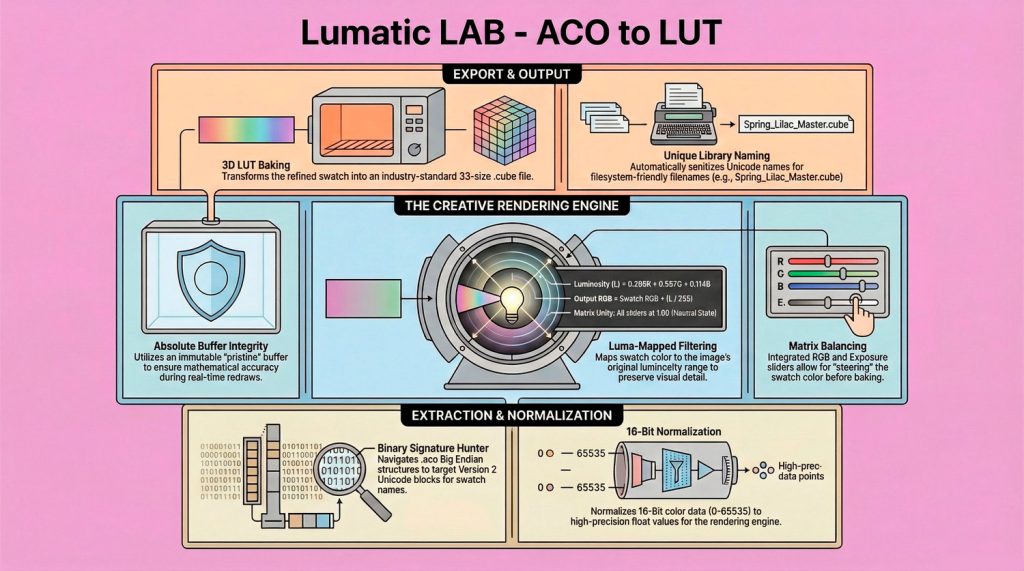
Most photo editors treat swatches as a simple paint bucket tool. The LUMATIC LAB approach is different. By treating a single swatch as a Target Primary for a luminosity map, we’ve essentially built a Monochrome Grading Engine.
- Brand-Accurate Grading: Turn Pantone sets or brand colors into a “Lookup Table” (LUT) for consistent video and photo campaigns.
- Luma-Mapped Filtering: Instead of a muddy color wash, our engine maps the swatch color to the image’s luminosity, preserving every detail of your original shot.
- Custom Tonal Response: Use the integrated Matrix Balance sliders to “steer” the color—pushing a pink swatch toward violet or adjusting density for a powerful B&W look before you bake the final file.
Technical Deep Dive: Under the Hood
For the enthusiasts who want to know exactly how their pixels are being handled, the ACO Converter v1.0.8 is built on several core engineering pillars:
1. The Binary Signature Hunter
Adobe .aco files are binary structures often containing two blocks. Our parser skips the basic Version 1 data to target the Version 2 Unicode blocks. This ensures we extract high-precision 16-bit color data and preserve the original swatch names (e.g., “Vintage Teal”) for your exported files.+4
2. Absolute Buffer Integrity
To prevent “data ghosting”—where changes stack and degrade image quality—we utilize an immutable Uint8ClampedArray named pristine. Every time you move a slider, the engine triggers a fresh redraw from this hidden clean buffer, ensuring 100% mathematical accuracy every single frame.+2
3. The Rosetta Stone Mathematics
We use a unified Luma calculation to create a linear ramp from Absolute Black to your Swatch Color: This formula ensures that pure white in your original image becomes 100% of the swatch color, while pure black remains 0%, creating a professional, transparent tint.
How to Get Started
The workflow is designed for high-speed “Extraction and Baking”. An updated set of documentation may be downloaded here.
Ready to elevate your color science? Download the LUMATIC LAB ACO Converter today and start turning your swatches into cinematic masterpieces.