
FotoSketcher, is a specialized desktop application designed to convert digital photographs into various artistic mediums such as paintings, sketches, and cartoons.
Unlike many modern competitors that rely on generative AI, this software utilizes classical image-processing algorithms, allowing users to maintain structural control while working entirely offline for data privacy. The texts detail the evolution of the program through version 4.40, highlighting new features like Lookup Tables (LUTs) for colour grading, a dedicated Script Editor for chaining effects, and a new light interface mode.
While the software is celebrated for being completely free for commercial use, the documentation also notes technical limitations, such as memory bottlenecks when processing high-resolution images. Additionally, the sources briefly compare FotoSketcher to other creative platforms like CapCut, which offers AI-driven web and mobile tools for similar digital transformations.
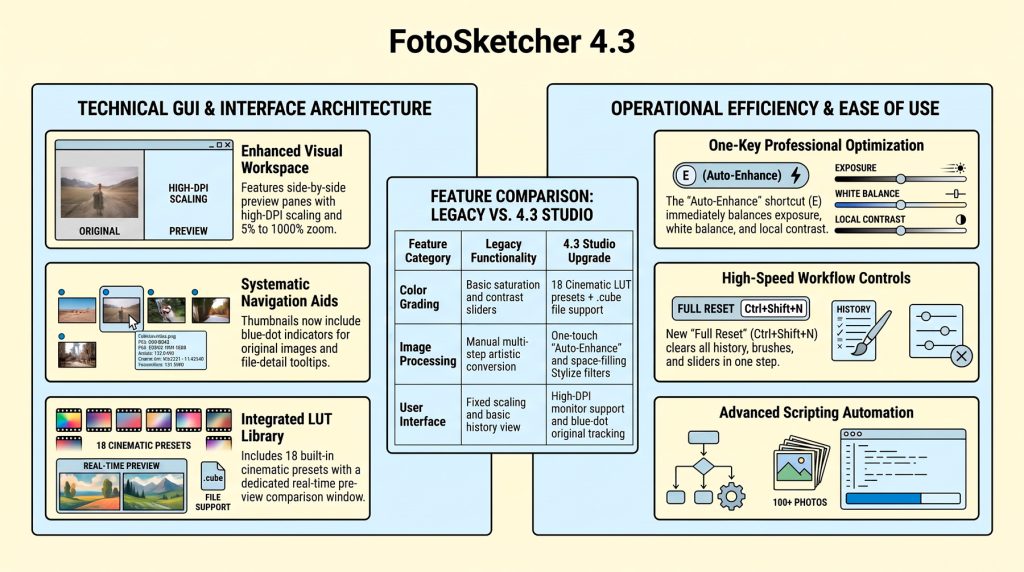
Collectively, these materials serve as a comprehensive guide to the functional capabilities, installation procedures, and automated workflows available within the FotoSketcher ecosystem.
Pixels to Pen Strokes: Art of Digital Line Drawing
Converting ordinary photos into extraordinary line art is a form of digital alchemy. By revealing intricate lines and hidden textures with just a few clicks, modern tools allow creators to infuse raw photography with sophisticated artistic expression.
The “Why” Behind the Sketch Digital conversion bridges the gap between snapshots and handcrafted aesthetics, making professional-grade stylization accessible to non-artists. Creators are pivoting to these tools for Personalization—transforming social media avatars into unique art portfolios—and high-end Design projects like logos and posters. This trend democratizes craftsmanship, architecting a world where visual depth is no longer restricted to those with physical brushes.
Choosing Your Tool: AI vs. Classical Algorithms Modern creators generally navigate two distinct technological paths to achieve their artistic goals:
- AI-Powered Speed: The CapCut image to image tool represents the frontier of generative speed, stylizing visuals in seconds. It excels with surreal styles and preset templates; however, generative models can occasionally introduce “structural flaws” or geometric inconsistencies.
- Deterministic Precision: FotoSketcher is the preferred choice for those demanding “offline data sovereignty.” Utilizing classical computer vision rather than generative AI, it preserves rigid structural proportions. Expert Tip: Use the Cartoon filter with color intensity set to zero to produce precise, pure line art. It is also an excellent tool for cleaning up AI-related artifacts found in generative outputs.
Expert Endorsement
“our favourite free program for applying artistic effects to your photos” –Computeractive magazine
Summary
Whether leveraging the web-based speed of CapCut or the offline precision of FotoSketcher, these platforms are democratizing the creative process. They empower anyone to unleash their creative edges in an increasingly visual digital landscape.