Summary
This video tutorial demonstrates how to use five powerful filters in Photo Raw to enhance and transform any type of photograph, including landscapes, wildlife, portraits, macro, and action shots.
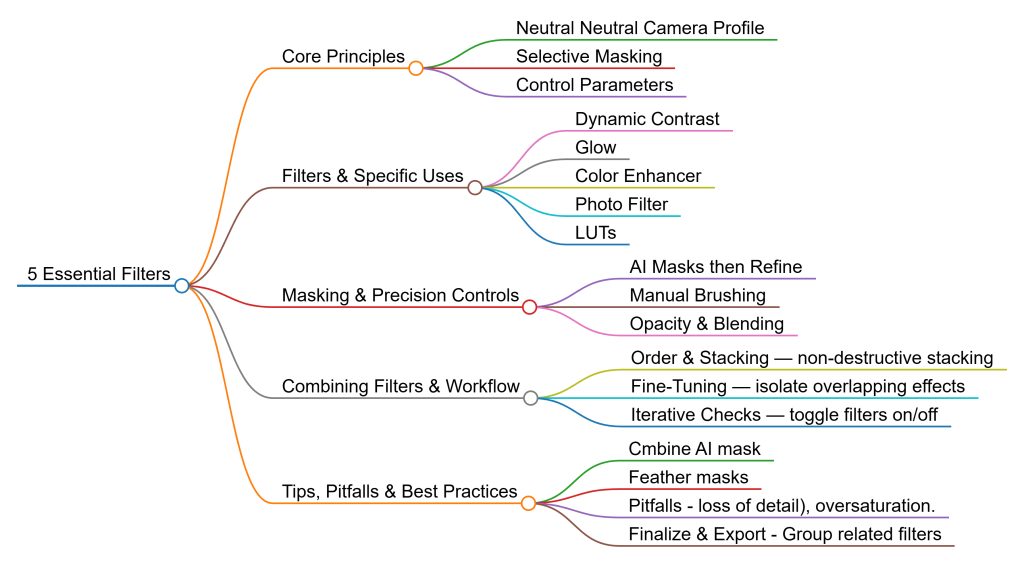
Discover the transformative power of Photo Raw’s five essential filters – Dynamic Contrast, Glow, Color Enhancer, Photo Filter, and LUTs – and learn how to apply them across various photographic genres to elevate your images.
Understanding the Filters
Starting with a neutral camera profile, this tutorial emphasizes the importance of selective masking for precise adjustments, allowing you to target specific areas like foliage, water, or subjects without affecting the entire image. The filters work collectively to enhance textures, colors, mood, and style while maintaining control over intensity through opacity and mask adjustments.
- Dynamic Contrast Filter: Bring out texture and detail in targeted areas with precision, using AI masks or manual brushing to selectively boost texture and tonal contrast.
- Glow Filter: Add a soft, dreamy haze to your images, particularly effective for water and backgrounds, creating a dreamy, atmospheric effect without sacrificing important detail.
- Color Enhancer: Fine-tune individual color ranges to enhance or mute colors selectively, vital for balancing color casts or enhancing specific elements like skies or foliage.
- Photo Filter: Recreate classic warming, cooling, or brightening effects with customizable methods, using masking for targeted use.
- LUTs Filter: Apply stylized color grading with options to control tonal contrast and color independently, creating dramatic black and white conversions or subtle color pops.
Key Insights and Learning Points
- Precision and Control: AI masking and manual brush tools enable precise control over where filters apply, preventing unwanted effects on sensitive areas.
- Fine-Tuning: Adjusting filter opacity and blending modes allows for subtlety or intensity in effects, offering more creative flexibility.
- Combining Filters: Stacking multiple filters can create complex, layered edits that enhance multiple aspects of an image simultaneously.
- Versatility: The five filters are adaptable across various photographic genres, from landscape to wildlife, portraits, macro, and action shots.
Practical Applications and Use Cases
- Landscape Photography: Use Dynamic Contrast to enhance texture and detail, and Glow to create a soft, dreamy atmosphere.
- Wildlife Photography: Apply Color Enhancer to balance color casts, and Photo Filter to warm or cool tones.
- Portrait Photography: Utilize LUTs for stylized color grading, and adjust opacity and blending modes for subtle effects.
Conclusion
Mastering these five essential filters in Photo Raw empowers photographers to quickly bring their creative vision to life and produce polished, visually compelling images. By encouraging experimentation with filter stacking, opacity, and blending modes, this tutorial provides a robust toolkit for elevating your images and adapting to any photographic scenario.