Freewillphotos

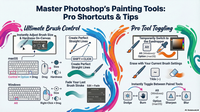
Using the brush tool in ON1 2026 – FWP

https://youtu.be/mAi8zPw6OdU Summary Chris’ tutorial focuses on a manual photo editing technique in On1 Photo RAW 2026 that avoids the use of AI tools, emphasizing a more hands-on approach to connecting with the image. Chris demonstrates how to remove unwanted distractions using the Perfect Eraser tool, then proceeds to darken the[…]

Read more
photoedit logo

Rapid RAW – a Lightroom clone ?

Summary We review a newly developed open-source Lightroom clone called Rapid Raw, created by a hobbyist developer in just two weeks ! Very briefly – The app’s features, interface, and functionality, highlight its promising potential despite its early stage of development. Rapid Raw offers a simple, clean user interface with[…]

Read more
Morganti logo

What’s NEW in Photoshop 2026 – AM

plus ‘cheat sheet’ & video – https://youtu.be/QTjyBvE2f-g Summary In this detailed overview, Anthony Morganti explores the new features in Adobe Photoshop 2026, highlighting improvements in AI-powered tools and workflow enhancements. Key updates include enhanced subject selection and background removal, with an option to process images either locally or via Adobe’s[…]

Read more
photoedit logo

GOOGLE AI Studio 5 updates – RM

Summary Google AI Studio has recently been updated, offering powerful yet underutilized AI tools that are free to use. The video showcases five practical use cases within Google AI Studio, highlighting how users can build and customize AI-driven applications without coding, generate native speech and multi-speaker audio, create professional B-roll[…]

Read more
photoedit logo

Colouring Images

Many people of all ages enjoy colouring in line art, you can create your own using AI by simply going to gemini.google.com, selecting one of your images (not too large) and typing, or copy / paste the following in ‘Ask Gemini’ Turn this image into a black and white line[…]

Read more
New Affinity Logo

Affinity update 2025

https://youtu.be/jxvzlb02Z7U Summary Affinity has released its biggest update yet, merging Affinity Photo, Designer, and Publisher into one unified app called Affinity. This new app is now free to use, marking a significant shift in its pricing model. However, advanced AI-powered features are accessible only via a Canva Pro subscription, reflecting[…]

Read more
Jim Nix - Luminar Neo

Luminar Neo Restoration – JN

https://youtu.be/rUVR8NKTmwg Summary This video provides an in-depth exploration of the upcoming Luminar Neo fall upgrade, focusing specifically on the new AI-based Restoration tool designed to bring old photos back to life. The tool offers three modes: full restoration (color and scratch removal), colorization only, and scratch removal only. Jim demonstrates[…]

Read more
Adobe Firefly Logo

Firefly 5 (Oct 25) : The Glow-Up

Summary Adobe has launched Firefly Image 5, a significant upgrade to its AI-powered image generation platform, designed to enhance creativity for digital artists and content creators. This version introduces native 4-megapixel resolution, a substantial improvement over the previous 1-megapixel output, delivering higher-quality images with better detail and human model rendering.[…]

Read more
Lightroom Logo

Lightroom Top 10 New Features (Oct 2025 Update) – MK

https://youtu.be/Ccvwvj-BdSk Summary The video discusses the latest features introduced in Adobe Lightroom (desktop version, not Lightroom Classic) as part of the Adobe Max conference updates. The presenter highlights around ten new or improved functionalities designed to enhance photo editing efficiency and creativity. Key features include the new variance slider for[…]

Read more
Adobe logo

New Features in LR Classic (v15) – JK

https://youtu.be/dKXqg50v1sA Summary Julian Kost presents 15 new features in Lightroom Classic that enhance photo editing efficiency and quality. Key additions include automatic dust removal, improved reflection removal, and enhanced object detection that now includes shadows and reflections. New color adjustment tools, such as the point color variance slider, allow for[…]

Read more
Jim Nix - Luminar Neo

Luminar’s New Light Depth – JN

https://youtu.be/ZkcCU-R_nMo Summary This video focuses exclusively on the new “Light Depth” feature in the Luminar Neo fall upgrade. Jim highlights how this depth-based masking tool revolutionizes photo editing by allowing precise control over lighting adjustments, simulating a 3D light effect on 2D images. Unlike traditional linear or radial gradients, Light[…]

Read more
ON1 2026 logo

ON1 2026 UI Improvements – DH

https://youtu.be/YIvHSSOPgcY Summary In this video, Dan introduces new workspace customization features in ON1 Photo 2026, focusing on improving usability on smaller laptop screens. He highlights the challenge of limited space when using the histogram, masking, and layers panels simultaneously, which often restricts the visible area for editing controls. To address[…]

Read more
Jim Nix - Luminar Neo

Luminar Fall Upgrade Full Demo!

https://youtu.be/QHgn7YL1KaQ Summary The video presents an enthusiastic overview of the upcoming fall upgrade to Luminar Neo, highlighting several new features designed to enhance photo editing workflows. The central focus is on the new Light Depth tool, a reimagined replacement for Relight AI, which provides powerful depth-based lighting adjustments that significantly[…]

Read more
thistle

5 Best on-line & FREE PHOTO EDITORS

https://youtu.be/uRT2hvbxcw4 Summary This video presents the top five free online photo editors, ideal for users who prefer browser-based editing without downloading software like Photoshop. The editors reviewed vary from beginner-friendly to advanced tools with a range of features including basic adjustments, text addition, collage making, and graphic design elements. The[…]

Read more
Scott Davenport Logo

ON1 2026 Next Level Masking – SD

https://youtu.be/IBADtmGhd3I Summary In this video, Scott Davenport explores the significant updates to masking tools in Photo RAW 2026, focusing on enhanced control and flexibility in creating complex masks. The new masking properties area allows photographers to add, subtract, and combine multiple mask layers easily, improving precision and editing efficiency. Scott[…]

Read more