
Free Mobile Phone Image Editors
a summary of mobile photo editing apps that offer genuine value without forcing you into hidden subscriptions, watermarking your exports, or blocking basic features behind immediate paywalls.
Read more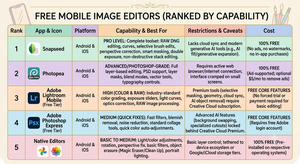
a summary of mobile photo editing apps that offer genuine value without forcing you into hidden subscriptions, watermarking your exports, or blocking basic features behind immediate paywalls.
Read more
Skylum is consolidating its software by rebranding its primary editor simply as Luminar, aiming to create a unified ecosystem across desktop and mobile platforms.
Read more
Fully familiarizing yourselves with these vital tool will help you stop fumbling with the camera, catch the odd shot you wouldn’t have previously
Read more
Improving your phone camera photography comes down to mastering three core habits: cleaning your lens – controlling your exposure, and framing your shot with care.
Read more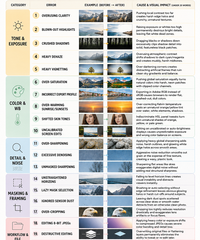
Post-processing is where an image gets refined – or completely ruined by heavy-handed adjustments. Here are the top 20 post-processing mistakes grouped logically into workflow categories, along with their root causes and visual impacts on your final images.
Read more
The ON1 2026.5 release focuses on the parts of the app you feel everyday: a modernized AI Inference Engine, an updated graphics rendering engine, and a faster, more predictable start-up and shutdown.
Read more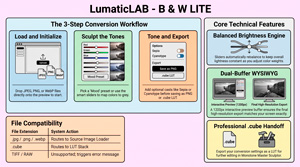
B & W Lite is a streamlined, offline image processing FOUNDATION tool designed to help beginners understand how to convert photographs into monochrome masterpieces using a precise, unified transformation engine.
Read more
DON’T FORGET – ALL our apps will run on Chromebook Plus, are totally secure, require NO SIGN UP and have no ‘hidden’ subscriptions or paid upgrades. This is the first time we have done a ‘Month in Review’ and we’ve split it into sections so you can quickly get an[…]
Read more
FreeVisuals, who have a similar philosophy to ourselves, created a review of the Motion Array product, so we created this summary, for those of our followers who regularly post on Youtube.
Read more
Until July 31, 2026, On1 Software is giving away NoNoise AI 2024.5 (latest version) for FREE. In his tutorial, Anthony Morganti, tells you how to get it. ON1 No Noise is designed to remove digital grain from high-ISO images while preserving fine details like feathers and fur. The guide demonstrates how the[…]
Read more
Photoshop success in 2026 requires a hybrid approach. Master the new AI-driven capabilities to remain competitive in speed, but anchor those tools in ACE-level foundations – non-destructive smart objects, precise masking, and 8-bit/16-bit awareness – to ensure your output is professional, relevant, and ready for publication.
Read more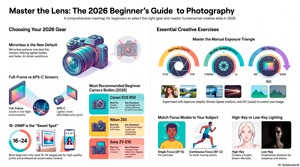
In 2026, moving from a smartphone to a dedicated mirrorless camera represents a decisive shift away from its’ algorithmic convenience.
Read more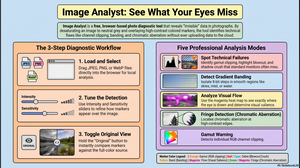
Every photograph hides information your eye glosses over. A sky that looks smooth is quietly banding into steps. A highlight you thought was bright is actually clipped, its detail gone for good. A corner of the frame is pulling attention away from your subject without you noticing. Image Analyst is[…]
Read more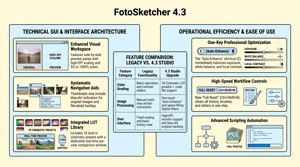
FotoSketcher, is a specialized, FREE desktop application designed to convert digital photographs into various artistic mediums such as paintings, sketches, and cartoons.
Read more
Professional Digital Asset Management (DAM) software addresses the challenge. of large numbers of images. Excire Photo 2027 is designed specifically for managing very large photo libraries spread across multiple drives.
Read more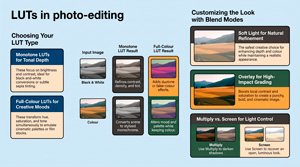
Outlines the functionality and application of Look-Up Tables (LUTs) in digital photography and image processing.
Read more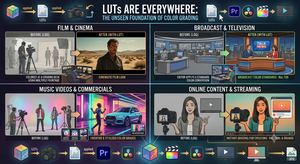
LUTs the digital shorthand of the visual world – They aren’t a shortcut; they are the essential infrastructure that makes professional color grading possible
Read more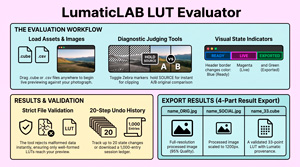
The friction of “blind” LUT application ends here. The LUT / CSV Evaluator provides the instant, offline environment needed to verify looks before they reach your workflow.
Read more
The primary purpose of the LUMATIC LAB Resampler is to enable a User to standardise the 3D LUTs they use by converting various cube sizes (such as 17³, 64³, and 65³) into a universally compatible format,
Read more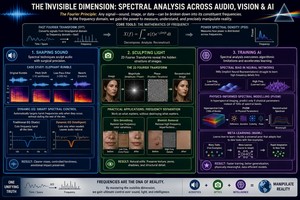
Spectral analysis or frequency domain across audio, visual arts, and AI
Read more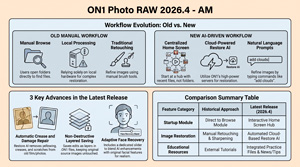
The text identifies significant updates introduced in on1 Photo RAW 2026.4, with a specific focus on the capabilities and limitations of its new Restore AI tool.
Read more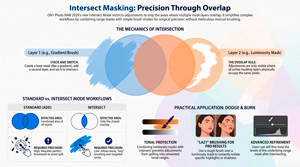
ON 1 Intersect Masking Mode is a game-changer for dodging and burning. Isolating tonal ranges through luminosity masks. Brushing maintains tonal integrity, helps prevent halos and color bleeding while significantly reducing manual effort.
Read more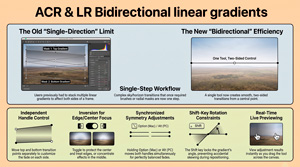
The June 2026 update for Adobe Camera Raw (18.4) has included greater integration within the Creative Cloud ecosystem.
Read more
The XMP Converter, is a browser-based utility designed to transform Adobe Lightroom and Camera Raw presets into more portable 33-point .cube LUTs ensuring your creative vision remains consistent across diverse production environments. XMP files serve as the underlying “recipe” for Lightroom Presets, enabling non-destructive editing by storing adjustments as text metadata. When you edit a photo, you are merely[…]
Read more
SEEING THE EVERYDAY provides a comprehensive collection of creative exercises and technical tutorials designed to help novice, or practiced, cell (mobile) phone photographers overcome artistic ruts and enhance their skills. The material suggest practical “jump-starts”, such as shooting with a single focal length, limiting shot counts, or capturing two dozen unique images from[…]
Read more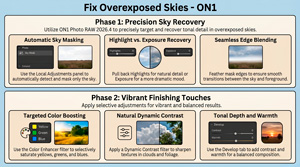
This ON1 video tutorial demonstrates a step-by-step workflow to enhance an overexposed image using ON1 Photo RAW 2026.4. It introduces the new home module features, specifically focusing on how users can access dedicated practice files to follow along with the lesson. The workflow prioritises precision sky masking and local adjustments to recover lost tonal detail[…]
Read more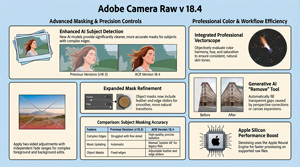
In the video, Julianne Kost details the functional upgrades and creative tools introduced in Adobe Camera Raw version 18.4, with a primary focus on AI-driven masking and colour precision. Significant improvements have been made to subject isolation and mask refinement, including the addition of a bidirectional linear gradient for more complex exposure adjustments. A professional vectorscope is now integrated into the[…]
Read more
Julieanne Kost talks about Adobe’s Lightroom Classic 15.4 update that introduces a suite of AI-driven enhancements designed to streamline photographic workflows and improve editing precision. She highlights key elements in the release, discussing refined masking capabilities and assisted culling tools that use intelligent scoring to evaluate subject focus and facial expressions. The software now includes a robust duplicate detection[…]
Read more
Adobe’s 2026 Creators’ Toolkit Report reveals that creative AI has become a foundational pillar of the modern creator economy, with the vast majority of users reporting significant gains in business growth and audience engagement. While these tools have dramatically increased production speeds, the data suggests that human taste, judgment, and a unique point of[…]
Read more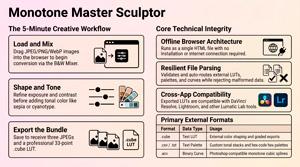
The Monotone Master Sculptor has a 4-stage workflow that can be summarised as Load, Build, Sculpt, and Export. Here is how you use each stage to edit your photos: Stage 1: Load (Input) Stage 2: Build the Foundation Stage 3: Sculpt theTones This stage involves manipulating light, contrast, and chemical[…]
Read more